Somewhere between the C64 and the Amiga: a brand-new computer with a 65C816 processor, custom chips for graphics, sprites, sound, copper and blitter, Microsoft BASIC and 16 MB of memory. Not an emulator but real logic inside the MiSTer's FPGA – designed, built and signed off on real hardware.
Runs on real hardwareStage 9 in progressFree core · open source
The C64 arrived in 1982, the Amiga in 1985. In between lies a gap that was never filled: a home computer that still feels like a C64 – switch on, READY., start typing – but can already do what made the Amiga famous. That is the machine we are building.
The name says it all: a meridian is the line between two halves. It is built as a core for MiSTer, an open FPGA platform on which classic computers are not emulated but recreated as circuits. Except that the MERIDIAN has no original to recreate – every chip is designed from scratch.
The idea and the sign-off on real hardware come from Marcel; design, code and testing from Claude, an AI by Anthropic. Every stage is documented in the build log – with all the decisions, detours and bugs.
1982C646510 · 1 MHz · 64 KB
in betweenMERIDIAN 81665C816 · 8 MHz · 16 MB
1985Amiga68000 · 7 MHz · 512 KB
Key figures compared
C64
MERIDIAN 816
Amiga 500
CPU
6510, 1 MHz
65C816, 8 MHz
68000, 7 MHz
Memory
64 KB
16 MB: 256 KB chip RAM + 15.7 MB extra memory
512 KB
Colours
16 fixed
256 of 4096
32 of 4096
Graphics
Text, 2 bitmap modes
2 layers: text 40/80, tiles with scrolling, bitmap with 16 or 256 colours
Bitplanes
Sprites
8
32 × 16×16 (or 32×32), 16 colours, no per-line limit
8
Special
Raster IRQ
Copper, blitter, raster IRQ
Copper, blitter
Sound
SID, 3 voices
4 synth voices + 4 sample channels, stereo
Paula, 4 sample channels
BASIC
Microsoft V2
Microsoft 1.1 + commands for graphics and sound
AmigaBASIC
The chips / German names, custom logic
One CPU and eight chips.
$C000–$C8FF
Just like Commodore back in the day, the MERIDIAN only buys in its CPU – a proven, free 65C816 core. Everything around it is home-made, and every chip has a German name that tells you what it does.
P65C816
Processor
8 MHz · 16-bit registers · 16 MB
The CPU of the Super Nintendo and the Apple IIGS: 16-bit registers, 24-bit addresses, and it runs 6502 code too. That makes the MERIDIAN a 16-bit computer with an 8-bit data bus that turns into a 6502 on request – which is how BASIC runs. The core comes from the MiSTer community – along the way we found and fixed two translation bugs in it.
PINSEL
Graphics · “paintbrush”
$C000 · 2 layers · 256 of 4096
Two layers on top of each other, each showing text with 40 or 80 columns, tiles with pixel-smooth scrolling, or a 320 × 240 bitmap in 16 or 256 colours. Colour 0 on the front layer is transparent: text over pictures, parallax from two tile layers. Because PINSEL has its own memory port, the CPU never waits for the graphics.
KOBOLD
Sprites · “goblin”
$C300 · 32 sprites · no line limit
32 sprites of 16 × 16 pixels or double size, each with 16 colours from its own palette bank, mirrorable, in front of or behind the front layer, with collision detection. All 32 may share the same line – the C64 managed eight. That is down to a dedicated pattern memory that delivers a whole sprite line in a single clock.
ORGEL
Sound · “organ”
$C500 · 4 synth + 4 samples · stereo
The SID soul: four synth voices with triangle, sawtooth, pulse and noise, ring modulation, sync, envelopes using the SID's own timing tables and a resonant filter – the registers are even in SID order. The Paula soul: four 8-bit sample channels with loops. Every voice has its own volume and its own place in the stereo field.
LOTSE
Copper · “pilot”
$C700 · 6 instructions · pixel-exact
A harbour pilot comes aboard and says exactly when to do what. LOTSE reads a command list, waits for a position of the electron beam and then sets registers: colours, layers, scrolling, sprites, even sound. That gives you gradients, split screens and waving logos without the CPU lifting a finger.
KRAN
Blitter · “crane”
$C600 · fills 17.6 MB/s · copies 8 MB/s
KRAN copies and fills rectangles in memory, optionally with transparency for game characters. It works through whole job lists while the CPU does something else. With stage 9a it reaches the extra memory too – already working in simulation. The Amiga's blitter never got anywhere near its Fast RAM.
PFORTE
Input/output · “gate”
$C100 · keyboard · 2 joysticks · 2 timers
A keyboard buffer for 16 events with German layout (PC or Mac), two joysticks with up to six buttons, two timers ticking in microseconds and a free-running clock. Reading has no side effects on purpose: the 65816 performs some “dummy” reads, and keys would otherwise get lost.
BOTE
Program loader · “messenger”
$C200 · menu or network · remote start
BOTE loads programs from the MiSTer menu – or straight from the development machine over the network: it writes into a mailbox in the MiSTer's memory, BOTE copies the program in via DMA and starts it. From the command on the Mac to the running program takes just under a second.
ZUSATZ
Extra memory · “add-on”
Banks $04–$FE · 15.7 MB SDRAM
ZUSATZ drives the MiSTer's SDRAM module at 48 MHz and maps 15.7 MB into the address space. Writing costs no time, reading one wait cycle. The biggest puzzle on the way: on MiSTer modules, the byte masks run over address lines.
Circuit board / how it all connects
The virtual mainboard.
REV 8
The MERIDIAN has no physical board – everything lives as circuitry inside the MiSTer's FPGA. Drawn out, it would look like this:
← swipe to explore →
System bus: CPU, ROMs and the registers of every chip
DMA: chips fetch their own data from memory
Video port: PINSEL reads chip RAM through a port of its own
MiSTer framework: keyboard, menu, network, picture and sound
The CPU is never stalled.
A CPU bus cycle takes three system clocks. The CPU only needs the RAM in one of them – the second for reading, the third for writing. The memory arbiter hands the remaining clocks to LOTSE, ORGEL and KRAN, in that order.
Graphics with a door of their own.
PINSEL reads chip RAM through a second port. While one line appears on screen, it is already painting the next into a line buffer. On the C64 the CPU had to wait whenever the graphics needed the bus (“badlines”) – here, never.
24 MHz heartbeat.
From a 24 MHz system clock the CPU gets every third tick (8 MHz) and the graphics chip every second (12 MHz pixels, 640 × 240 visible, 60 or 50 Hz). Why not 48 MHz? The longest path through the CPU logic takes about 26 ns – at 48 MHz there would only be 20.8.
Screenshots / straight from the MiSTer
No mock-ups. It all runs.
RUN
The stills come from a real MiSTer, grabbed through the capture card. The demo programs were written on the Mac in 65C816 assembler and sent to the MERIDIAN over the network.
BALLETT – up to 248 balls drawn by the blitter, sky and raster bars from the copper, plus music from ORGEL. 60 frames per second. Picture from the simulation (pixel-identical to the hardware), sound from the MiSTer's audio output.
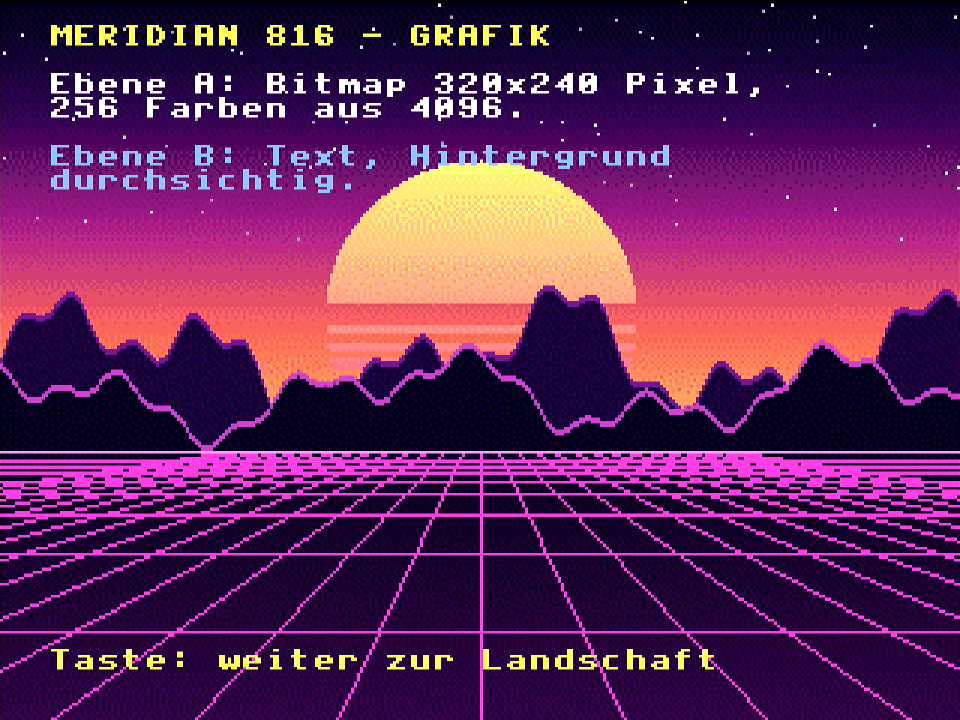
GRAFIK bitmap with 256 of 4096 colours, text on the transparent front layer
GRAFIK two tile layers as parallax – the sky is a raster interrupt
KOBOLDE UFO on the joystick, balls on a Lissajous path, collisions, a score made of sprites
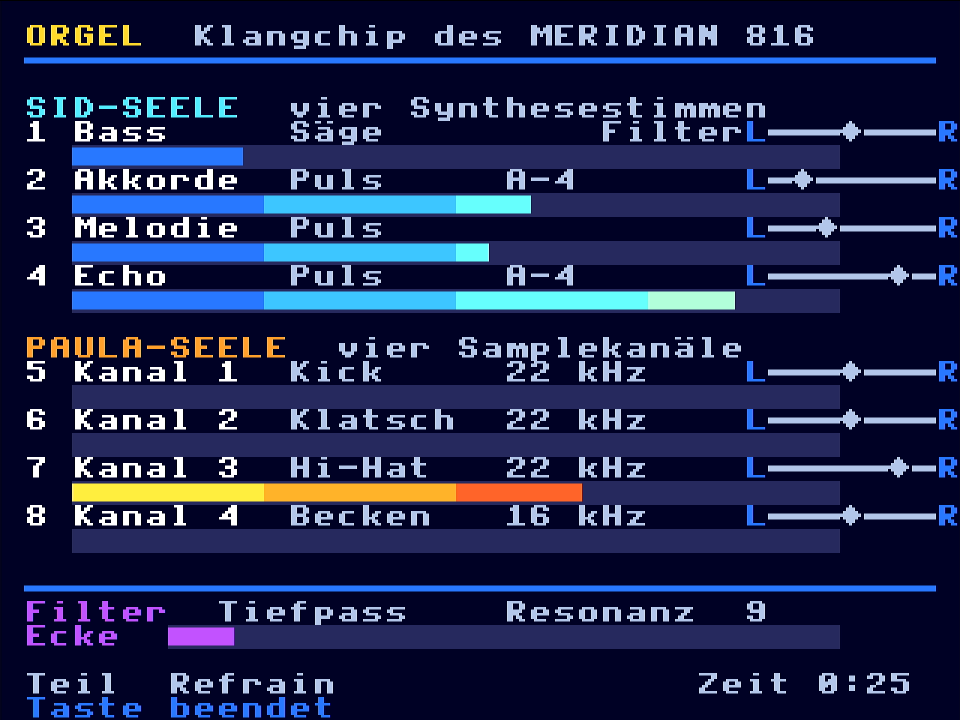
ORGEL eight channels, eight meters – the synth bars show the real envelope read back from the chip
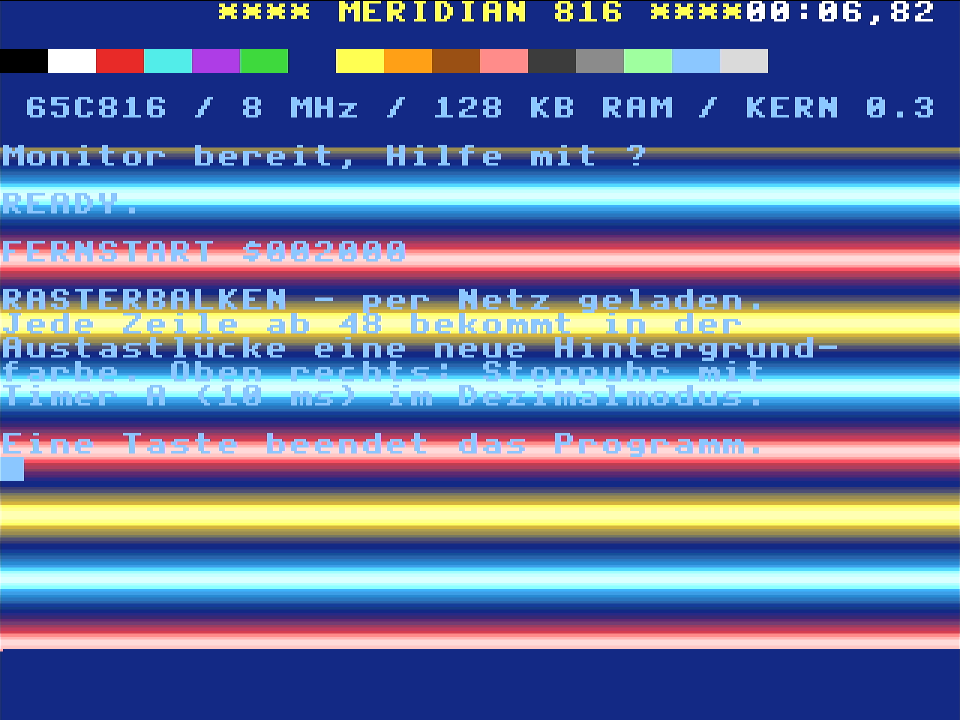
RASTERBALKEN the very first program, loaded over the network: a new colour in every blanking interval
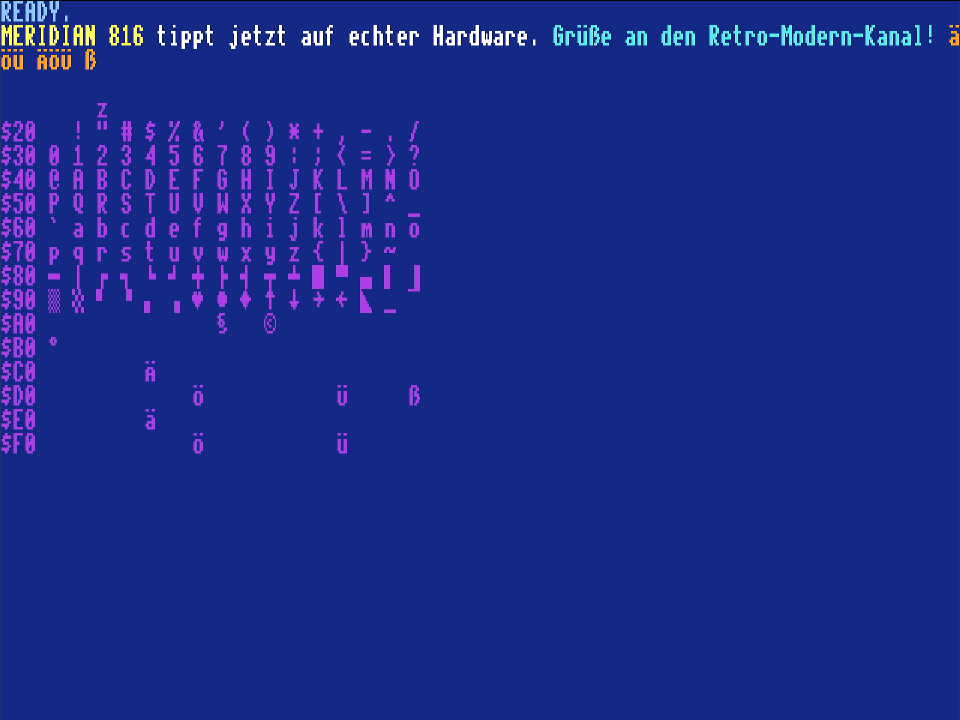
MONITOR 80 columns, colours via Ctrl+digit, umlauts straight from the German keyboard
IN MOTION KOBOLDE – from the simulation, real speedIN MOTION parallax – mountains one pixel every two frames, hills two pixels per frame
SOUND // ORGEL // HARDWARE
This is what the MERIDIAN sounds like.
ORGEL's tune in A minor at 125 BPM: bass with a filter sweep, chords, a melody with echo and drum samples. Recorded from the MiSTer's audio output.
BASIC / Microsoft's original from 1978
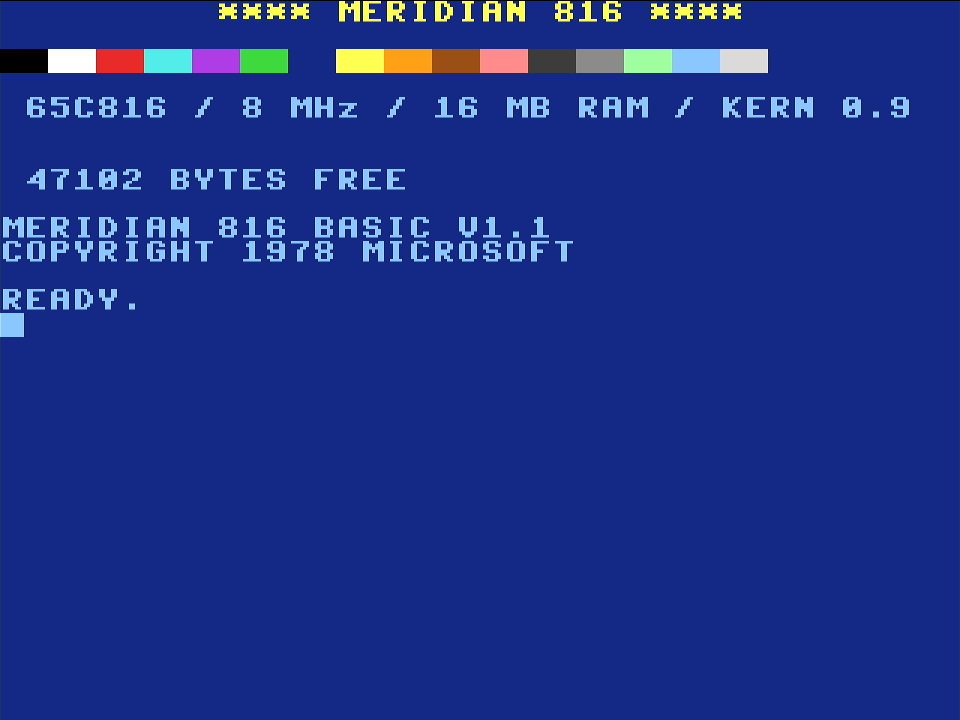
Switch on. READY. Start coding.
47102 BYTES FREE
The MERIDIAN starts the way a home computer should: in BASIC. Not a clone, but Microsoft BASIC M6502 1.1 built from the original source code, which Microsoft released under the MIT licence in 2025 – the same family tree as the BASIC in the PET, the Apple II and the C64.
The catch: the source is written for MACRO-10, the assembler of a PDP-10 mainframe. That assembler no longer exists. So we wrote a translator that turns Microsoft's code into modern assembler syntax – octal numbers and period macros included. Everything else is still Microsoft's code. The ROM even keeps the hidden greeting “WRITTEN BY WEILAND & GATES”.
BASIC runs in the 65816's 6502 mode – at 8 MHz instead of 1 MHz. And it has more room than on the C64: 47,102 bytes for programs (C64: 38,911), because program and variables live in a memory bank of their own.
The same BASIC code on both machines
C64
MERIDIAN
FOR I=1 TO 1000:NEXT
1.03 s
0.12–0.13 s
300 × SIN(I)
8.9 s
1.02 s
PROGRAM // REGENBOGEN (RAINBOW) // 11 LINES
10 rem *** regenbogen - meridian 816 basic ***
20 cls:grafik 1
30 for x=0 to 319 step 2
40 linie 160,239,x,0,16+x*.75
50 klang 1,200+x*2,1:warte 1
60 next:klang 1,0
70 for a=0 to 6.29 step .01
80 punkt 160+120*sin(a*3),110+90*cos(a*2),1
90 next
100 klang 1,523,1:klang 2,659,1:klang 3,784,1
110 warte 90:stille
REGENBOGEN 160 lines across the colour wheel, a tone for each, then a Lissajous figure and a C major chord. Picture from the simulation, sound from the hardware.
The new keywords are German, like the chip names: GRAFIK graphics, PUNKT point, LINIE line, FARBE colour, MODUS mode, KLANG sound, STILLE silence, WARTE wait.
The new words in MERIDIAN BASIC
GRAFIK 1 / GRAFIK 0
switch on and clear a 320 × 240 bitmap with 256 colours in front of the text / switch it off
PUNKT x,y,f · LINIE x1,y1,x2,y2,f
draw – lines are drawn by the kernel in fast 16-bit code
PALETTE n,r,g,b
remix one of the 256 colours; 16 to 255 start out as a colour wheel
KLANG s,hz,w · STILLE
a tone on one of the four synth voices: frequency in Hz, triangle, sawtooth, pulse or noise
CLS · FARBE v,h · MODUS 80
clear screen, colours, 40 or 80 columns
WARTE n
wait n frames (1/60 s)
SAVE · LOAD
store the program in extra memory and back
PEEK · POKE · WAIT
with 24-bit addresses: POKE 65536*4,123 writes to extra memory
MONITOR
enter the machine-code monitor, return with BASIC
One word had to be renamed: the sound command was first called TON (German for “tone”). But Microsoft's BASIC would have read FOR I=1 TON as TO N – so it became KLANG.
Build log / 3 and 4 October 2026
Eight stages to a home computer.
LOG
From the first READY. to BASIC with 16 MB took two days. Every stage ran in simulation first, then on the MiSTer, signed off through the capture card. For testing, Claude even types on it: via a virtual USB keyboard that a small script creates on the MiSTer.
01
3 October
“READY.” – CPU, RAM, ROM, text mode
The free 65C816 core, 128 KB of RAM, a custom character set with umlauts and a kernel ROM in assembler. The first start in simulation worked straight away – only the cursor would not blink.
What went wrong
After the WAI instruction the CPU fell asleep forever. The culprit was a translation bug in the Verilog core: IRQ_N = '0' had become IRQ_N == 1. And the clock was first meant to be 48 MHz – but the CPU logic needs about 26 ns, while 48 MHz only allows 20.8. Hence 24 MHz.
02
3 October
Keyboard, screen editor, monitor
German layout for PC and Mac keyboards, a screen editor like the C64's, a machine-code monitor with built-in help and a fixed jump table for your own programs.
What went wrong
The cursor interrupt used the same scratch variables as the editor – a bug that would only have struck now and then. Spotted while reading the code, before it ever happened. And the simulation's first test keyboard typed Y and Z in US layout: the ROM was right, the simulation was not.
03
3 October
Loading programs, timers, raster line
BOTE loads programs from the menu or over the network and starts them via NMI. The first program: RASTERBALKEN, with a stopwatch counting in decimal mode.
What went wrong
On the second send, the restart never came. An NMI got lost if it arrived just before the end of an instruction – the second translation bug in the CPU core. The simulation gained a “send twice” test; since the fix, “FERNSTART” appears twice on screen.
04
3 October
Graphics: two layers, tiles, 256 colours
Text, scrolling tiles and bitmaps on two layers. Plus a synthwave picture and a parallax landscape – all generated by script, no borrowed images.
What went wrong
Quartus had built the chip RAM twice, because of a detail in how reads behave during writes. Described properly, it fits straight into the FPGA's memory blocks – and 128 KB became 256 KB.
05
3 October
Sprites: KOBOLD
32 sprites without a line limit thanks to a dedicated pattern memory – and a little game with a UFO, balls and collisions.
What went wrong
At first every sprite dragged vertical stripes behind it: a 2-bit line tag matched again every four lines. The fix is a register with one bit per pixel that is cleared in a single clock at the start of each line.
06
3 October
Sound: ORGEL
A SID soul and a Paula soul in one chip. A small tracker in Python pre-computes the music; the MERIDIAN plays it back with 30 lines of assembler. Hardware and simulation sound the same – measured, not guessed.
What went wrong
On the hardware, one note sounded a good one per cent sharp. The clock? A five-minute cross-check: 8 ppm deviation, spot on. The recording was to blame – it dropped whole blocks. Lesson learned: distrust the measuring chain before the chip.
07
3 October
Copper and blitter: LOTSE and KRAN
Plus a memory arbiter that hands out the free cycles. The demo BALLETT manages 248 balls in 11.2 ms per frame – at 60 frames per second.
What went wrong
Marcel couldn't hear the kick drum. Rightly so: 96 % of its energy was below 100 Hz, where small speakers reproduce nothing. The cure: a new kick, a little saturation and a bass that briefly ducks out of the way on every hit.
08
3 and 4 October
16 MB of memory and BASIC
ZUSATZ brings in the SDRAM, Microsoft BASIC 1.1 gets its own commands. In the end the MERIDIAN reports 47,102 bytes free – more than the C64.
What went wrong
In the first memory test, every byte written landed in both halves of a 16-bit word: 99.6 % errors. The MiSTer's SDRAM modules carry the byte masks on address lines A11 and A12. After that: 16 MB without a single error.
09
in progress
Extra memory for everyone – and BASIC learns the chips
KRAN already shovels data between extra memory and chip RAM, error-free in simulation. Next, BOTE will load straight into SDRAM, and then comes the real goal: sprites, samples, copper and blitter from BASIC – plus KOPIERE (copy) for big blocks.
Data sheet / for the curious
The numbers.
M D000
Memory map as the CPU sees it
$00:0000
zero page and stack
$00:0400
screen memory – a nod to the C64
$00:1800
character set
$00:2000
free for programs
$00:C000
the chips: PINSEL, PFORTE, BOTE, KOBOLD, ORGEL, KRAN, LOTSE, SYSTEM
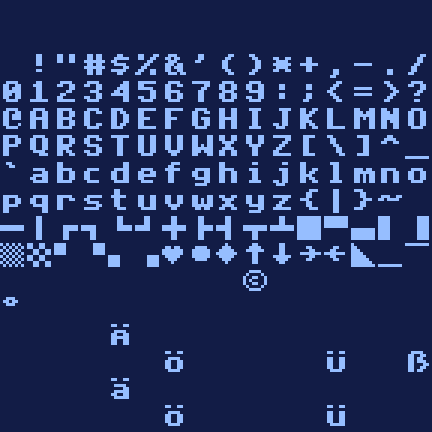
CHARACTER SET designed in-house: ascenders and descenders, Ä Ö Ü ä ö ü ß, lines and blocks
Get involved / programs and games wanted
A computer needs software.
A home computer lives on what people write for it. That is exactly what we hope for the MERIDIAN: games, demos, music, tools – or BASIC listings to type in, just like the magazines of old.
Free, in the spirit of MiSTer.
The core will be released free of charge and open source under the GPL-3, like almost everything in the MiSTer project – in a public Git repository. There is no date yet; it will be announced here and on the channel.
A DE10-Nano with an SDRAM module, as most MiSTer owners already have. The module provides the extra memory.
How to program it
BASIC or assembler.
BASIC right on the machine, with commands for graphics and sound. Or 65C816 assembler on a PC or Mac, for example with 64tass, loading the result as a MER file from the MiSTer menu. A fixed jump table in the kernel helps you get started, and an interrupt hook at $0300 tips its hat to the C64's $0314.
What comes with it
Source code, the MiSTer way.
The complete source of the core in a public Git repository, including a description of the chip registers. Plus the demo programs as source code – GRAFIK, KOBOLDE, ORGEL, BALLETT, REGENBOGEN and the rest – to learn from, tinker with and build on.
The MiSTer project and its core template ↗ – picture, sound, menu and input come from the community's framework; documentation ↗
Assembler 64tass ↗, simulation with Verilator, built with Quartus
Drum samples and voice-overs in the demos: ElevenLabs
MERIDIAN 816 is a private hobby project and is not affiliated with the MiSTer project, Microsoft, Commodore or Amiga. All trademarks belong to their respective owners.